iPhone Duo can add fake bezel to the outside screen for better case compatibilit
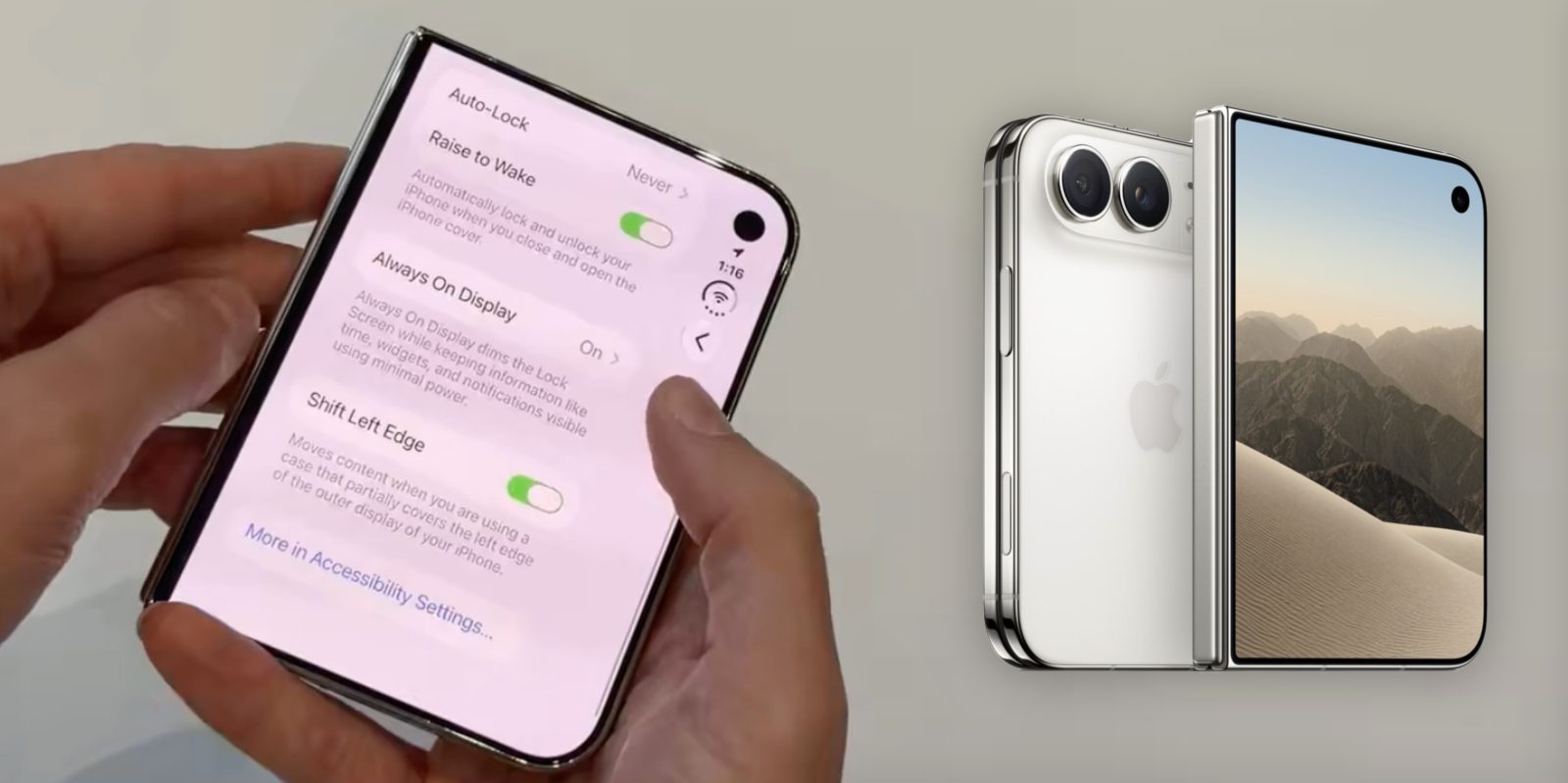
Blogger Nicolas Lellouche uncovered a little‑known option while exploring the iPhone Duo’s display settings. The feature, called Shift Left Edge, adds a subtle black border on the outer screen’s left side.
Discovery in the settings menu
During a hands‑on session, Nicolas Lellouche noticed the new toggle tucked under the display preferences. Enabling it immediately painted a thin line of darkness along the left edge, effectively creating a fake bezel. The change is visible even without a case attached to the device.
What the setting actually does
Apple describes Shift Left Edge as a tool that “moves content when you are using a case that partially covers the left edge of the outer display of your iPhone Duo.” In practice, the software shifts UI elements inward, preventing them from being obscured by case material. The demo video shows the border roughly doubling in width compared with the stock black margin.
Potential case scenarios
The description hints at a specific use case: a protective shell that overlaps the left side of the outer screen. Apple’s launch lineup includes two first‑party accessories: the iPhone Duo Case and the iPhone Duo Folio with Kickstand. Neither appears to mask the left edge dramatically, but the setting may still be useful for users who prefer a tighter fit.
Why the setting matters for third‑party makers
Third‑party accessory designers often experiment with rugged or bulkier constructions. A case that extends over the display could interfere with touch responsiveness or visual clarity. By offering Shift Left Edge, Apple gives developers a software workaround that preserves a consistent user experience across diverse form factors.
Technical implementation details
When the toggle is active, the operating system recalculates the safe‑area insets for the outer display. The black border is not a hardware overlay; it is rendered by the GPU as part of the UI composition pipeline. This approach ensures that all apps respect the shifted layout without requiring individual updates.
Impact on app developers
Developers relying on the default safe‑area values will automatically inherit the adjusted margins. However, apps that hard‑code pixel positions may need to test against the new configuration. Apple’s documentation encourages the use of dynamic layout guides to stay compatible with Shift Left Edge.
User experience considerations
For most users, the added border is barely noticeable, especially on a device with a high‑resolution OLED panel. Those who enable the setting for a case that truly covers the left edge will appreciate the extra breathing room for icons and text. The visual trade‑off is a modest loss of screen real estate.
Comparison with previous iPhone models
No prior iPhone generation offered a software‑driven bezel simulation. The iPhone Duo’s folding design introduces unique challenges, prompting Apple to innovate on the UI side. This marks the first instance where a system setting directly compensates for physical case geometry.
Community reaction and speculation
Tech forums have buzzed with speculation about the intended case designs. Some users wonder if Apple plans to release a rugged shell that deliberately overlaps the left side. Others argue the feature may be a legacy option retained from internal prototypes that never reached market.
Real‑world testing results
In the short demo, the border’s width appears to double, turning a 2‑pixel margin into roughly a 4‑pixel dark strip. While the exact measurement varies with screen scaling, the effect is consistent across multiple screenshots. The visual shift is enough to keep UI elements clear of any encroaching material.
Compatibility with accessories
Both the iPhone Duo Case and the iPhone Duo Folio with Kickstand are sold at launch, but neither seems to require the setting. Users who prefer a slimmer profile may still enable Shift Left Edge as a precaution. The setting remains optional and can be toggled off without affecting core functionality.
Future outlook for adaptive displays
Apple’s move hints at a broader strategy of software‑driven adaptation for foldable devices. As more manufacturers explore flexible screens, dynamic safe‑area management could become a standard feature. The Shift Left Edge toggle may be an early glimpse of that evolving ecosystem.
Potential for automation
iOS could eventually detect a case’s geometry via magnetic sensors or NFC tags, automatically enabling Shift Left Edge when needed. Such automation would eliminate the manual step, delivering a seamless transition between protected and uncovered states. For now, users must enable the option manually.
Summary of key points
• Shift Left Edge adds a black border on the left side of the iPhone Duo’s outer display.
• The setting is intended for cases that partially cover the left edge, moving content inward.
• Apple ships two first‑party accessories—iPhone Duo Case and iPhone Duo Folio with Kickstand—which may not need the toggle.
• Third‑party rugged cases could benefit most from the feature, preserving usability.
The discovery by Nicolas Lellouche underscores how even subtle software options can influence hardware accessory design. As the foldable market matures, Apple’s willingness to expose such controls may set a precedent for future devices.