Here’s what’s new with parental control features in iOS 27, iPadOS 27, and macOS
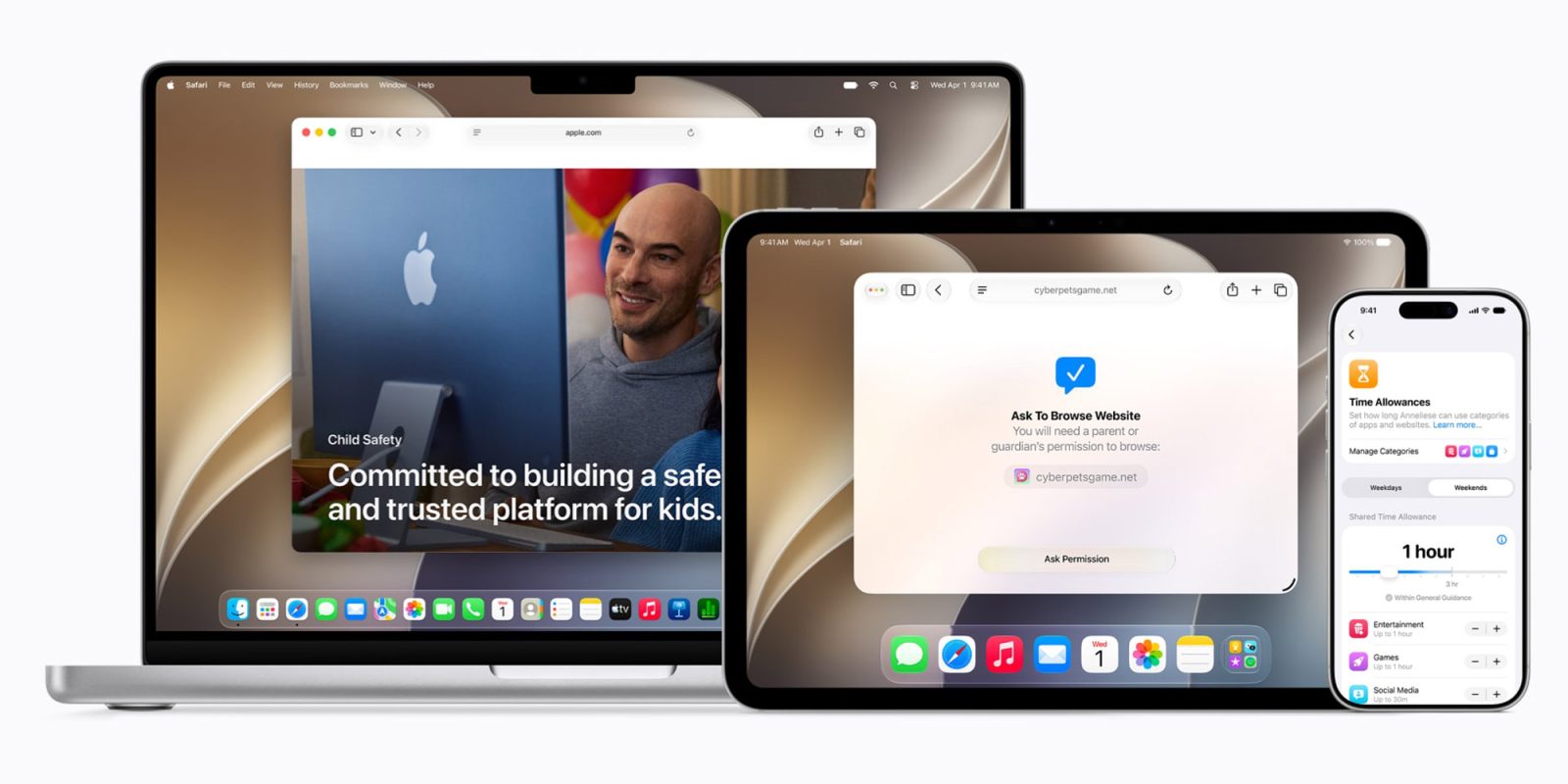
Apple today released iOS 27, iPadOS 27, and macOS 27 with a new suite of parental control features designed to help families manage digital experiences more effectively. The updates were previewed earlier during the WWDC26 keynote in June and are now available to users. These changes focus on improving safety, communication, screen time management, and parental oversight across Apple devices. All features are integrated into the Child Accounts system, which remains mandatory for users under 13 or the regional equivalent minimum age. The updates aim to provide parents with intuitive tools to guide their children’s technology use in a structured and age-appropriate way.
Core Focus Areas of the New Parental Control Suite
The new Screen Time enhancements center on four key areas: content access, communication controls, device usage timing, and centralized management for parents. These pillars allow families to tailor restrictions based on age, maturity, and family values. Apple emphasizes that the tools are designed to be both powerful and easy to use, reducing complexity for caregivers. Each area works in tandem with the others to create a cohesive safety net across devices. The system ensures that settings applied on one device sync seamlessly to others within a Family Sharing group. This unified approach helps prevent inconsistencies that could undermine parental efforts.
Child Accounts Setup and App Management
With iOS 27, Apple has simplified the initial setup process for new Child Accounts. Parents can begin by selecting a small set of essential apps, choosing a recommended starter configuration, or manually picking which Apple apps their child can access from the first use. This flexibility allows for a gradual onboarding experience tailored to the child’s needs. Once the account is active, parents retain full control over which apps and websites are permitted. They can also apply age-based restrictions to media categories such as movies, TV shows, music, books, and podcasts. These settings are enforced consistently across iPhone, iPad, and Mac devices linked to the same Apple ID.
Ask to Browse and Communication Safety Features
A notable addition is Ask to Browse, which enables children to request access to blocked websites in Safari through a prompt that appears in Messages for parental approval. This mirrors the existing Ask to Buy functionality used for app downloads and in-app purchases. Parents receive these requests in real time and can approve or deny them with a single tap. Communication Safety has also been expanded beyond its original nudity detection scope. It now identifies and blocks gore or violent content in shared images and videos, displaying a warning and offering educational resources to help children understand why the content was restricted. These protections apply across Messages, AirDrop, and other sharing methods within the ecosystem.
Time Allowances and Customizable Scheduling
Parents can now set shared or individual daily time limits for customizable app categories such as Entertainment, Games, and Social Media. They also have the ability to create detailed schedules that determine which apps are available at specific times of day, with variations possible depending on the day of the week. For example, stricter limits could apply on school nights while weekends allow more flexibility. Time Allowances have become more dynamic: parents can create their own app categories, move apps between them, and assign time limits immediately after approving a new app via Ask to Buy. Websites associated with an approved app automatically inherit the same time allowance, reducing the need for manual configuration. Apple states that its suggested Time Allowances are informed by expert research and developed in collaboration with the American Academy of Pediatrics to align with their Family Media Plan guidelines.
Cross-Device Sync and Usage Insights
Screen Time has undergone a architectural redesign to improve synchronization speed and reliability across devices in a Family Sharing group. Parents can now view weekly usage summaries and see their children’s most-used apps at a glance from any device. Additional controls include the ability to temporarily pause device access, grant limited-time extensions, and switch between different schedules quickly. These tools are intended to support responsive parenting without requiring constant manual adjustments. Apple specifies that all devices in a Family Sharing group must be running iOS 27, iPadOS 27, or macOS 27 to access the full suite of new Screen Time features. Older software versions will not support the updated controls or syncing capabilities, ensuring consistency and security across the family unit.