Apple’s new child safety features now available
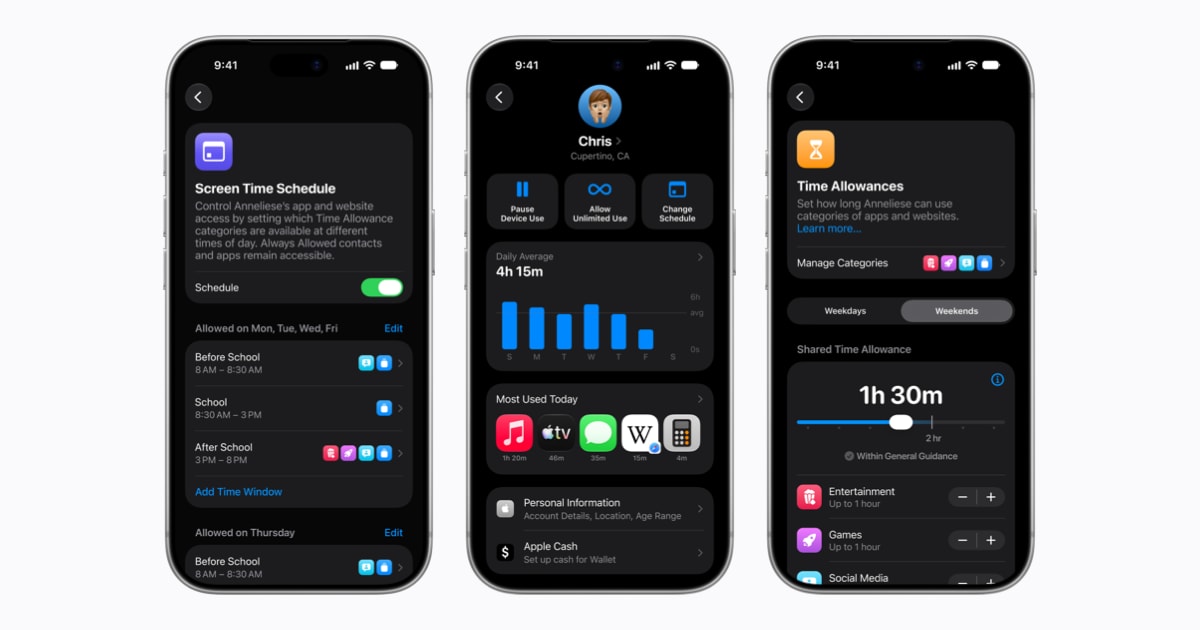
Apple announced on September 14, 2026 that a fresh suite of child‑safety tools is now live across its latest operating systems. The update arrives as part of the iOS 27, iPadOS 27, and macOS 27 releases, giving parents deeper control over content, communication, and screen time.
Simpler Setup and Essential Apps
The revamped setup experience automatically suggests a curated list of essential apps when a new child account is created. This recommendation reduces the time parents spend configuring accounts while ensuring kids start with age‑appropriate tools. Apple’s design team focused on intuitive navigation, letting families launch the setup with just a few taps.
Ask to Browse: Real‑Time Web Approval
A standout addition, Ask to Browse, forces a parental approval step before a child can load an unfamiliar website in Safari. When a youngster attempts to visit a new URL, a prompt appears on the parent’s device, allowing a quick “allow” or “block” decision. This real‑time gate keeps unexpected content from reaching the child’s screen.
Expanded Communication Safety Protections
Apple has broadened its Communication Safety filters to block not only nudity but also gore and violent imagery. The protection now scans shared photos, videos, and even live streams during FaceTime calls, automatically hiding disallowed material. By extending coverage to violent content, Apple aims to shield children from a wider range of harmful media.
Time Allowances with Expert‑Informed Guidance
The Time Allowances feature offers age‑tailored recommendations for managing time spent in key app categories such as Social Media, Entertainment, and Games. Parents receive a starting point based on research from child‑development experts, then can fine‑tune limits to match family values. The guidance is presented as a helpful baseline rather than a strict rule.
Redesigned Screen Time Dashboard
A refreshed Screen Time interface now delivers an at‑a‑glance view of daily usage across devices. One‑tap controls let parents instantly adjust limits or pause access without digging through multiple menus. The visual redesign emphasizes clarity, making it easier for families to spot trends and intervene promptly.
Collaboration with Health and Safety Experts
Apple’s updates were shaped in partnership with leading online‑safety authorities, most notably the American Academy of Pediatrics. The company is adapting the Academy’s Family Media Plan into a practical guide that parents can reference while using Apple products. This collaboration ensures the tools align with the latest pediatric recommendations.
Dedicated Website for Parents
To help families navigate the new capabilities, Apple launched a dedicated website that aggregates tutorials, FAQs, and step‑by‑step walkthroughs. The portal showcases each feature, explains how to enable them, and provides best‑practice tips for fostering a healthier digital environment. All resources are freely accessible from any Apple device.
Availability and Compatibility Requirements
All the child‑safety enhancements are available now through the Screen Time update in iOS 27, iPadOS 27, and macOS 27. For full functionality, every device in a Family Sharing group must run iOS 27, iPadOS 27, macOS 27, watchOS 27, and visionOS 27. Apple notes that some features may be limited by region, language, or hardware model, and directs users to its website for detailed availability information.
Looking Ahead: Safer Digital Experiences
Apple’s commitment to child safety reflects a broader industry shift toward proactive parental controls. By integrating expert guidance, real‑time web approvals, and expanded content filters, the company sets a new benchmark for protecting young users. As families adopt these tools, Apple expects a measurable reduction in exposure to inappropriate material and more balanced screen‑time habits.
How to Get Started
Parents can begin by updating their devices to the latest OS versions via Settings → General → Software Update. Once updated, the new Screen Time panel will appear, guiding users through the child‑account creation and feature activation process. The dedicated website offers video demos for each tool, ensuring even less‑tech‑savvy families can implement the safeguards quickly.