Apple hid a classic Mac easter egg in the iOS 27 Settings app
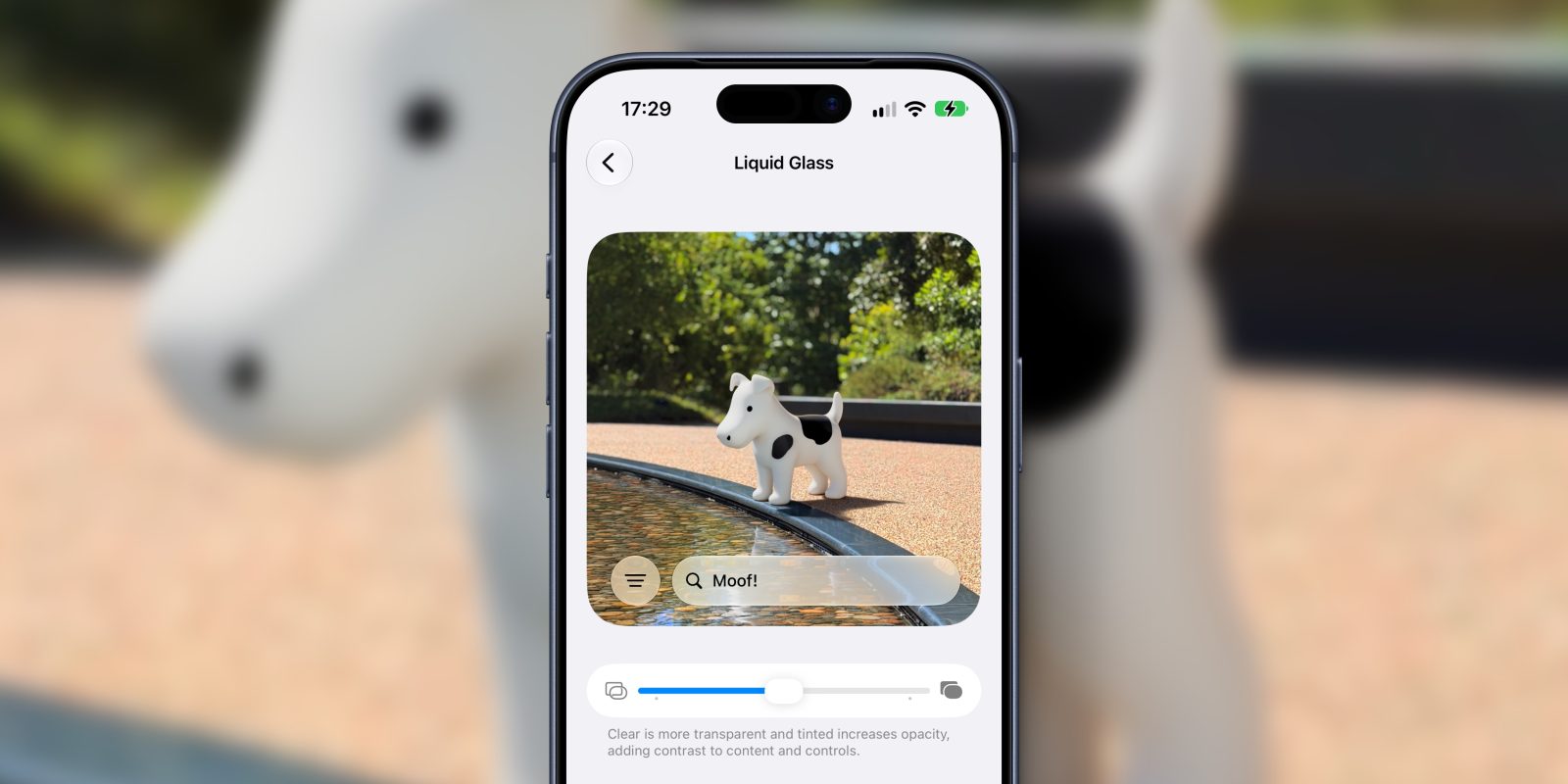
Apple Revives Classic Whimsy with Clarus the Dogcow Easter Egg in iOS 27
After years of feedback suggesting Apple’s design language had lost some of its playful spirit, the company appears to be rekindling its tradition of hidden delights. A newly discovered easter egg in iOS 27 brings back one of the most beloved oddities from classic Mac OS: Clarus the Dogcow. This whimsical creature, once a staple of Apple’s early interface design, has resurfaced in a subtle but meaningful way, delighting long-time fans and introducing a new generation to a piece of Apple lore.
Background
Clarus the Dogcow originated as a glyph in the Cairo font, designed by Susan Kare for the original Macintosh in 1984. It was not intended as a functional icon but rather as a playful, non-standard character included for amusement. Over time, it gained a cult following among developers and designers who appreciated its absurd charm. Though largely phased out as Mac OS evolved, Clarus occasionally reappeared in developer documentation and system resources as an inside joke. Its return in iOS 27 marks a rare, official nod to this piece of Apple’s design heritage.
The easter egg is tied to a new feature in iOS 27 that allows users to adjust the intensity of Liquid Glass transparency effects. This feature, found under Settings → Appearance → Liquid Glass, includes a slider ranging from Clear to fully Tinted. Apple designed this pane to include a preview area where users can see how the effect alters the appearance of interface elements. Within this preview, a scrollable region displays sample text and photography from Apple Park, providing a realistic context for testing the visual impact of the transparency settings.
Specifications
To activate the easter egg, users must scroll all the way to the bottom of the Liquid Glass preview pane and continue pulling upward with their finger. This action triggers a hidden animation that reveals a photo of a Clarus the Dogcow figurine positioned next to the Apple Park pond. The figurine is rendered in a style that matches the original 1984 design, complete with its distinctive spotted pattern and bovine-canine hybrid features. Above the figurine, rainbow-colored text reads “Moof!”, the onomatopoeic sound traditionally associated with the Dogcow in Apple’s internal culture.
The easter egg extends beyond the visual reveal. If users type “Moof!” into the Spotlight search field and activate Siri, the assistant responds with the phrase “Nice dogcow.” This auditory feedback reinforces the playful nature of the discovery and confirms that Apple has intentionally woven multiple layers of interaction into the feature. The same easter egg is also present in macOS Golden Gate, accessible through the Appearance menu in the System Settings app, indicating a cross-platform effort to revive this legacy element.
Features
The Liquid Glass transparency slider itself represents a new customization option in iOS 27, allowing users to fine-tune how much background content shows through interface elements like menus, panels, and overlays. At the Clear setting, the effect is nearly invisible, while fully Tinted applies a strong color wash that enhances contrast and focus. The preview pane was likely included to help users understand the visual trade-offs between aesthetics and readability, especially in varying lighting conditions.
By embedding the Dogcow within this preview, Apple transformed a functional settings page into a moment of discovery. The inclusion of Apple Park photography grounds the experience in the company’s current identity, while the sudden appearance of Clarus creates a temporal bridge to its past. This juxtaposition suggests a deliberate design philosophy: innovation need not come at the expense of whimsy. The easter egg serves as both a homage and a signal that Apple values its history, even as it pushes forward with new technologies like advanced material rendering and dynamic UI effects.
Performance
While the easter egg has no impact on system performance, its discovery has generated significant discussion across tech forums and social media. Users have shared screenshots and video demonstrations of the activation process, with many expressing nostalgia for the classic Mac era. The feature requires no additional processing power, as the Dogcow image and associated text are likely stored as static assets within the Settings app bundle. The scroll-triggered reveal relies on existing gesture recognition systems, meaning it adds negligible overhead to the user experience.
The fact that the same easter egg appears in both iOS 27 and macOS Golden Gate suggests a coordinated effort across Apple’s operating systems. This consistency reinforces the idea that the feature is not a bug or leftover debug code, but an intentional design choice. By making it accessible through a natural interaction—pulling down beyond the content boundary—Apple invites curious users to explore, rewarding attention to detail with a moment of delight.
Price and Availability
iOS 27 is available as a free software update for compatible iPhone models, continuing Apple’s tradition of providing major OS upgrades at no cost. The Liquid Glass transparency feature and its associated easter egg are included in the initial release of iOS 27 and are available on all devices that support the update. There are no regional restrictions, and the feature functions identically regardless of language or locale settings. Similarly, the macOS Golden Gate version of the easter egg is available to all users of that operating system update, at no additional charge.
Apple has not announced any plans to monetize or restrict access to this feature, nor has it indicated that the Dogcow will be removed in future updates. Given its cultural significance and positive reception, it is likely to remain a permanent part of the system software, much like other long-standing easter eggs such as the “Hello” message in Terminal or the hidden game in older versions of macOS.
Verdict
The return of Clarus the Dogcow in iOS 27 is more than just a nostalgic throwback—it’s a thoughtful reaffirmation of Apple’s design ethos. By embedding a piece of its history within a modern customization feature, Apple demonstrates that innovation and playfulness can coexist. For longtime fans, it’s a warm reminder of the company’s roots; for newer users, it’s an invitation to explore the quirky, human side of technology. In an era where operating systems often feel increasingly uniform and utilitarian, moments like this stand out as quiet acts of rebellion against the bland. Apple hasn’t just brought back a dogcow—it’s brought back a little bit of wonder.